AI Automation
Automated Excel Data Cleaning Pipeline
Upload a messy customer spreadsheet through a form and get back a validated, de-duplicated file with customer IDs and a summary report.
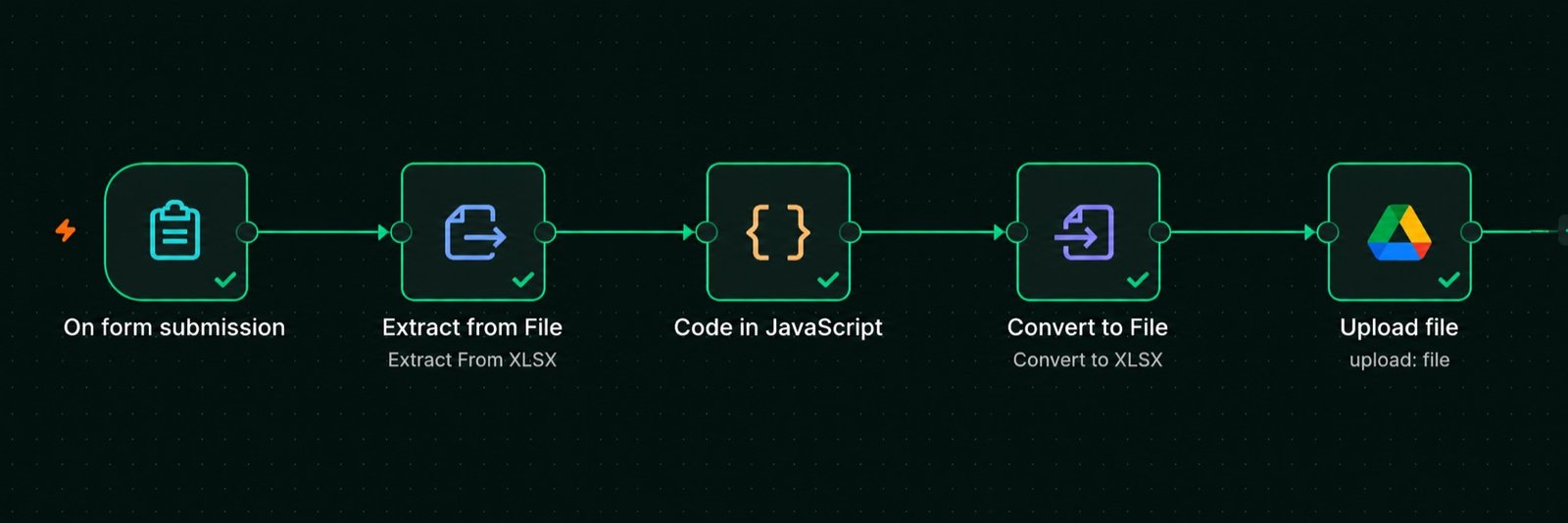
How it flows
- 1Upload the Excel file through an n8n form
- 2Extract all rows from the spreadsheet
- 3JavaScript cleans, validates, and de-duplicates
- 4Convert the result back to .xlsx
- 5Save clean_customers.xlsx to Google Drive
The problem
Client customer lists arrive with empty rows, duplicate people, mixed capitalisation, extra spaces, broken emails, wrong phone numbers, and dates in four different formats. Cleaning them in Excel by hand takes hours and still misses things.
What I built
A five-node n8n workflow. Most of the work happens in one JavaScript Code node.
Cleaning rules
- Trim and collapse spaces in every text field.
- Proper Case for names and cities (
john doe→John Doe,DHAKA→Dhaka). - Email — lower-cased and checked against a pattern;
john@gmailis rejected. - Phone — digits only, must match
^01\d{9}$(11 digits, starting with 01). - Dates — handles
YYYY-MM-DD,DD/MM/YYYY,DD-MM-YYYY,May 1, 2025, and raw Excel serial numbers such as45778. Everything becomes2025-05-01. - Empty rows and rows missing name, email, or phone are removed and counted.
- Duplicates — a row is dropped if its email or phone was already seen.
- Customer ID —
CUST-0001,CUST-0002, … assigned to the clean rows.
Summary report — after the data, the file contains a block with: total rows imported, empty rows removed, missing values removed, invalid emails removed, invalid phones removed, duplicates removed, and the final row count.
Result
A team member uploads a file and receives clean_customers.xlsx in Google Drive a few seconds later. Every row in it is valid, consistent, and unique.