AI Automation
RAG Email Customer Support Agent with Human Approval
Reads incoming support emails, retrieves the right answer from a vector knowledge base, drafts a reply, and waits for a human to approve before sending. Built in three industry variants.
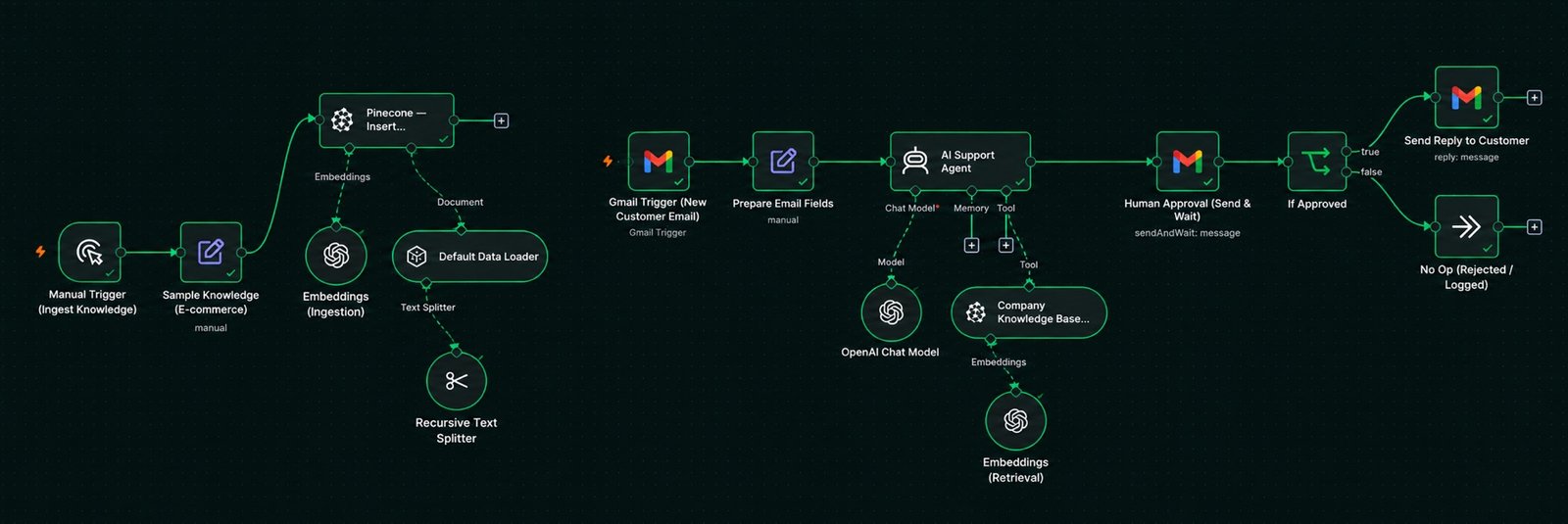
How it flows
- 1New customer email arrives in Gmail
- 2Fields are normalised (sender, subject, body, thread)
- 3AI Agent searches the Pinecone knowledge base
- 4Draft reply is emailed to a reviewer with Approve / Reject buttons
- 5Approved reply is sent in the original thread
The problem
Support teams answer the same questions every day: refund policy, shipping times, how to reset a password. An AI reply is fast, but a wrong AI reply damages trust. The system needed to be accurate and safe.
What I built
One n8n workflow with two parts.
Ingestion (run once, or whenever documents change)
- A manual trigger loads the company knowledge text.
- A Recursive Text Splitter cuts it into 800-character chunks with 100-character overlap.
- OpenAI embeddings turn each chunk into a vector.
- The vectors are inserted into a Pinecone index.
Reply flow (runs every minute)
- A Gmail trigger picks up new customer emails (and ignores the approval emails it sends itself).
- A Set node prepares clean fields: sender, subject, body, thread ID, message ID.
- An AI Agent (GPT-4o-mini, temperature 0.2) is given the Pinecone store as a retriever tool. The system prompt says: always search the knowledge base first; answer only from retrieved content; if the answer is not there, say you will escalate.
- A Gmail Send and Wait node emails the draft to a reviewer with the original customer message and two buttons: Approve & Send or Reject. The workflow pauses here.
- An If node checks the decision. Approved drafts are sent as a reply in the customer’s thread. Rejected drafts go to a No-Op branch for manual handling.
Three industry variants
The same workflow was cloned with a different knowledge base and Pinecone index for each:
- E-commerce — orders, shipping tiers, returns, payments, warranties
- SaaS — accounts, plans and billing, integrations, troubleshooting, security
- Education — enrollment, course access, certificates, refunds, instructors
Each knowledge base includes an escalation note that tells the agent which topics (billing disputes, security incidents, accessibility requests) must always go to a human.
Why it matters
The retriever tool gives the model real company facts. The approval step gives the company control. Together they turn an experiment into something a real support team could run.