← All projects
AI Automation
LinkedIn Job Alert Automation
A webhook takes a job title and location, runs an Apify LinkedIn scraper, waits for it to finish, and writes clean job rows plus an AI market summary into Google Sheets.
n8nApify APIWebhooksGoogle SheetsOpenAI
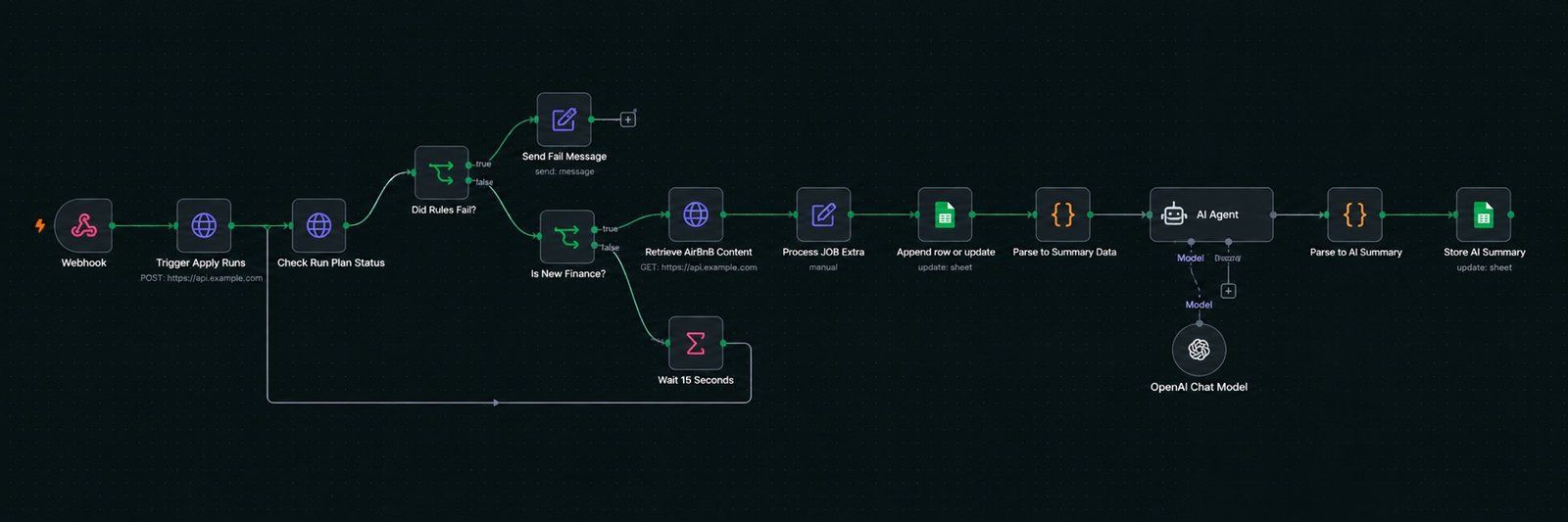
How it flows
- 1POST request with jobTitle, location, limit
- 2Start the Apify LinkedIn scraper actor
- 3Poll run status every 30 seconds until done
- 4Fetch the dataset and normalise each job
- 5Append rows to Google Sheets
- 6AI writes a hiring-trend summary to a second sheet
The problem
Recruiters were searching LinkedIn every morning, copying job posts into a spreadsheet by hand, and sending them to candidates. Slow, repetitive, and easy to get wrong.
What I built
An n8n workflow triggered by a webhook. A request like this starts it:
{ "jobTitle": "Python Developer", "location": "Remote", "limit": 20 }Steps
- Trigger Apify actor — an HTTP POST starts the LinkedIn Jobs Scraper with the keyword, location, “last 24 hours” filter, and company enrichment.
- Check run status — an HTTP GET reads the run. An If node checks for
FAILEDand returns a clear error message. Another If node checks forSUCCEEDED; if not yet, a Wait 30 seconds node loops back. - Retrieve dataset — once finished, the results are fetched with the requested limit.
- Process job data — a Set node maps title, company, location, posted time, job URL, and company URL. A small JavaScript expression scans the description for remote, hybrid, or on-site and labels the row.
- Append to Google Sheets — one row per job.
- AI summary — a Code node counts top companies, locations, and work types. An AI Agent turns that into a short JSON summary (common hiring companies, common locations, hiring trends). A second Code node parses the JSON safely and appends it to a Summary sheet.
Result
One HTTP call replaces the whole morning routine. The sheet contains fresh listings with clean columns, and the summary tab gives a two-line picture of the market for that search.