← All projects
AI Automation
YouTube Video Automation Agent
From a single topic to a published YouTube video — script writing, scene images, AI video clips, Bengali voice-over, merging, and upload, all in one n8n workflow.
n8nOpenAIKIE AIShotstackElevenLabsGoogle DriveYouTube API
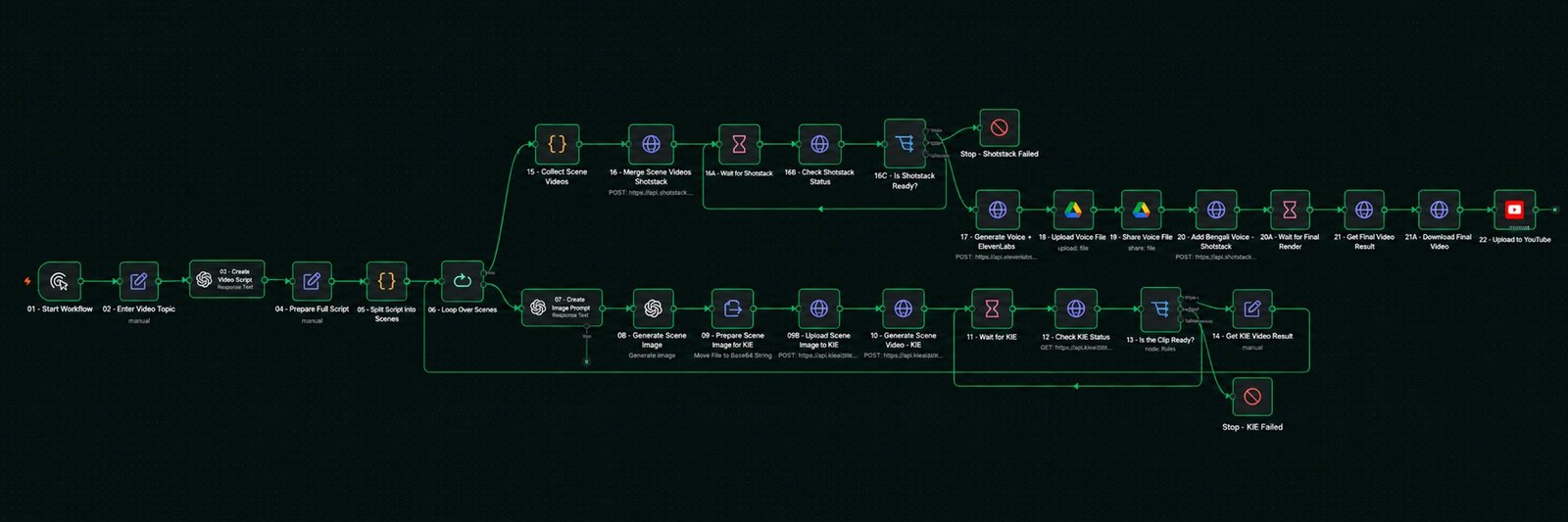
How it flows
- 1Enter a video topic
- 2AI writes the script and splits it into scenes
- 3For each scene — image prompt, image, short AI video clip
- 4Merge clips, add Bengali voice-over
- 5Download the final render and upload to YouTube
The problem
Making a short faceless video by hand means writing, generating images, animating them, recording a voice, editing, and uploading — six tools and an afternoon. The goal was to reduce that to typing one topic.
How the workflow runs
- Script — the topic goes to an OpenAI node that writes a full script, and a Code node splits it into scenes.
- Scene loop — for every scene:
- OpenAI writes an image prompt.
- An image is generated and uploaded to KIE.
- KIE turns the image into a short video clip.
- A Wait → Check status → Is the clip ready? loop polls until the clip exists. A failure branch stops the workflow and reports which scene failed.
- Merge — all clips are collected and sent to Shotstack. Another poll loop waits for the merged video.
- Voice — ElevenLabs produces a Bengali voice-over from the script. The audio file is uploaded to Google Drive and shared so Shotstack can read it.
- Final render — Shotstack adds the voice to the merged video. One more poll loop waits for the render.
- Publish — the final file is downloaded and uploaded to YouTube.
What I learned
Chaining several media APIs works only if every step waits properly and fails loudly. Numbering the nodes (01 to 22) and adding explicit Stop nodes made the workflow easy to debug when one service was slow.